

4️⃣ Service configuration (setup) for VDS (Step IV.I)
-
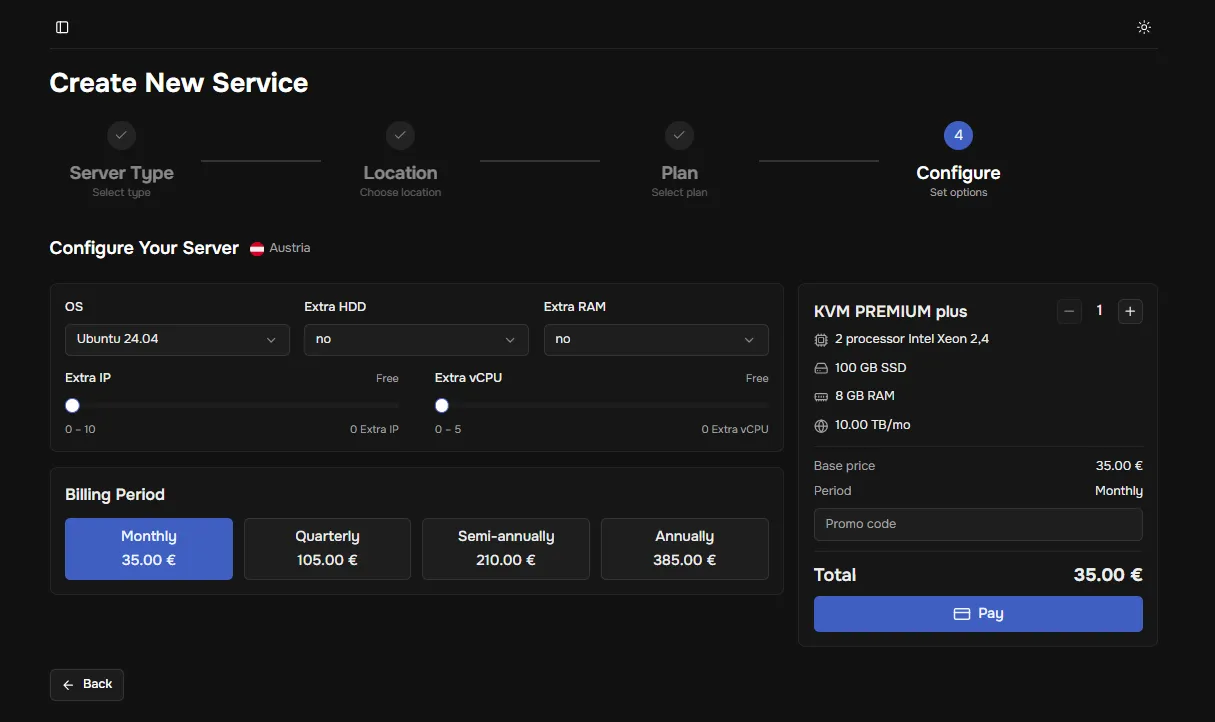
After selecting a plan (tariff), you can configure the service — choose the optimal characteristics for your tasks.
-
Configurations:
- OS – choose a pre-installed operating system.
- Extra HDD – increase disk space.
- Extra RAM – increase RAM capacity.
- Extra IP – add the required number of IP addresses.
- Extra vCPU – increase the number of virtual processors.
- Billing period – choose the payment frequency (from monthly to yearly).
- Quantity – how many identical service units of the selected configuration will be purchased/added to the cart.
-
Configuration selection:
- Review the offered list of service settings.
- Adjust each option according to your needs and budget.
- Proceed to payment by clicking “Pay”