

📝 Creating a ticket
Tickets – a system of user requests to our technical support for resolving issues that arise while using services.
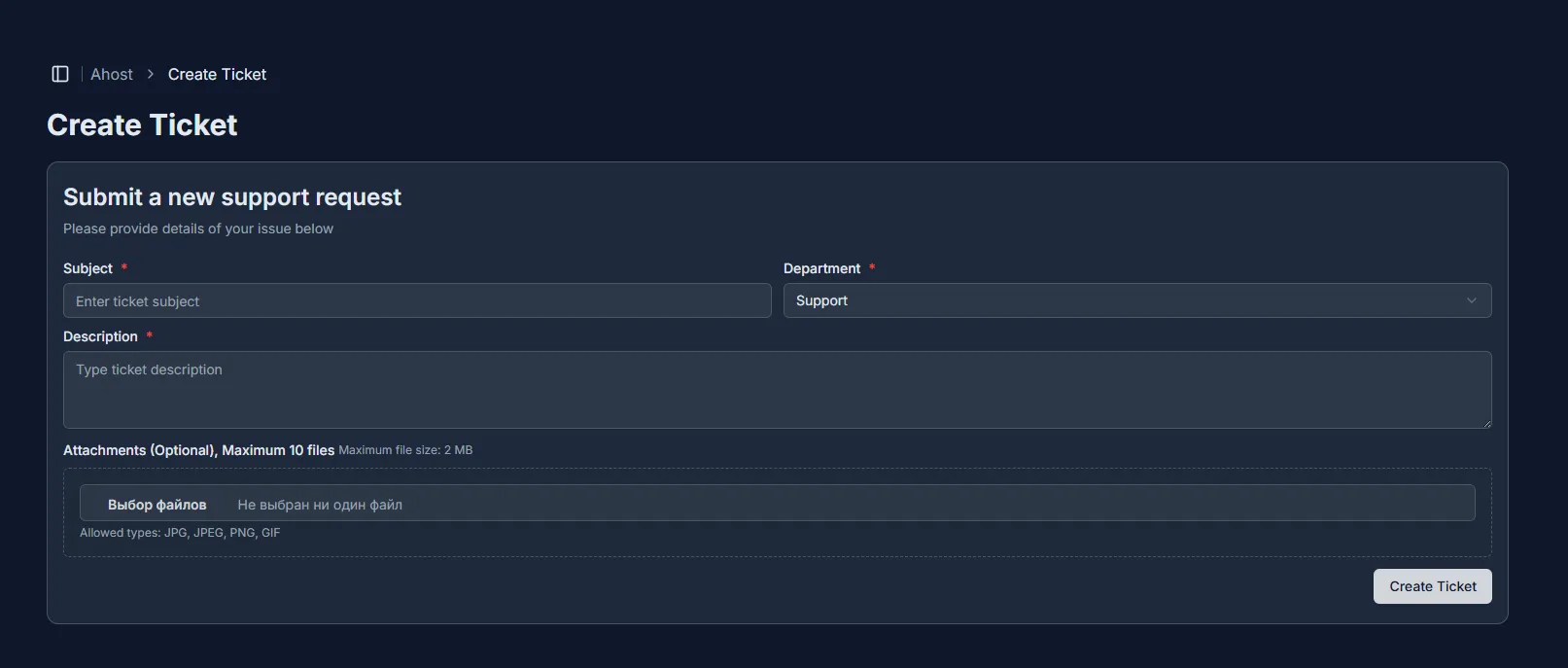
To create a ticket, follow these steps:
- Log in to the billing panel: Go to https://billing.ahost.host.
- Open the “Support” section and click “Create ticket.”
- Enter the subject of your request in the “Subject” field: Briefly and clearly describe the issue (for example, “Website not loading” or “Payment error”).
- Select the appropriate department from the dropdown list: This will help direct your request to the right specialists.
- Describe the problem in detail in the “Description” field: Specify when the problem occurred, what you have already tried, and include any helpful details (URLs, error screenshots, etc.).
- (optional) Attach files: You can add up to 10 attachments (logs, screenshots, documents) — this will help speed up the issue resolution.
- Click the “Create ticket” button to send your request.
💡 Tip: Please describe your issue as specifically and clearly as possible. Avoid vague phrases like “Help, everything is broken” — this will save both your and our time and speed up problem resolution.