

📀 ISO mounting
To mount or unmount an ISO image:
- Go to the My Services section in the left panel.
- Select the desired server and click View details.
- The detailed service page will open.
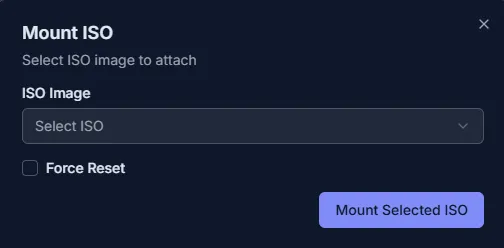
Mounting an ISO Image
- Open the management menu On the service page, find the System Controls block and click Mount ISO.
- Select an ISO image In the Mount ISO window, choose the desired ISO file from the dropdown list. Optionally, check Force Reset if you want the server to reboot and boot from the ISO.
- Attach the ISO Click Mount Selected ISO. A notification will appear: ISO mounting started.
- Verify the result The System Controls section will now show information about the mounted ISO, and the Unmount ISO button will become available.
Unmounting an ISO Image
- Go to the management menu In the System Controls section, click Unmount ISO.
- Wait for confirmation Once the process completes, you will see the message: ISO unmounted successfully. The Mount ISO button will be active again.