

🚨 The Windows server shuts down after startup
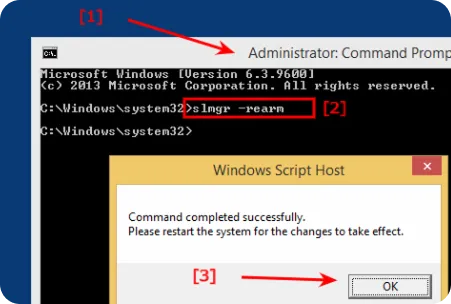
If the server runs Windows Trial, once the evaluation period expires, the system enters a restricted mode. One of the symptoms is automatic shutdown or reboot approximately 60 minutes after startup. This is normal behavior for expired Windows Evaluation editions.
- Open Command Prompt as Administrator. Press Start → Search → cmd → Run as Administrator.
- Enter the command: slmgr -rearm
- Confirm execution. Press Enter. A message will appear indicating the operation completed successfully.
- Restart the computer. The reset will take effect only after a reboot.
- Check activation status. Enter in the same command prompt: slmgr -dli This will show the current license status and remaining rearm count.
Note that stable and uninterrupted operation of Windows Server can only be ensured by activating a valid license.